A native app from your terminal
Three commands — and the app is on your phone. Any editor, any AI agent, publishing by link. Free.
Your device, your AI, your files.
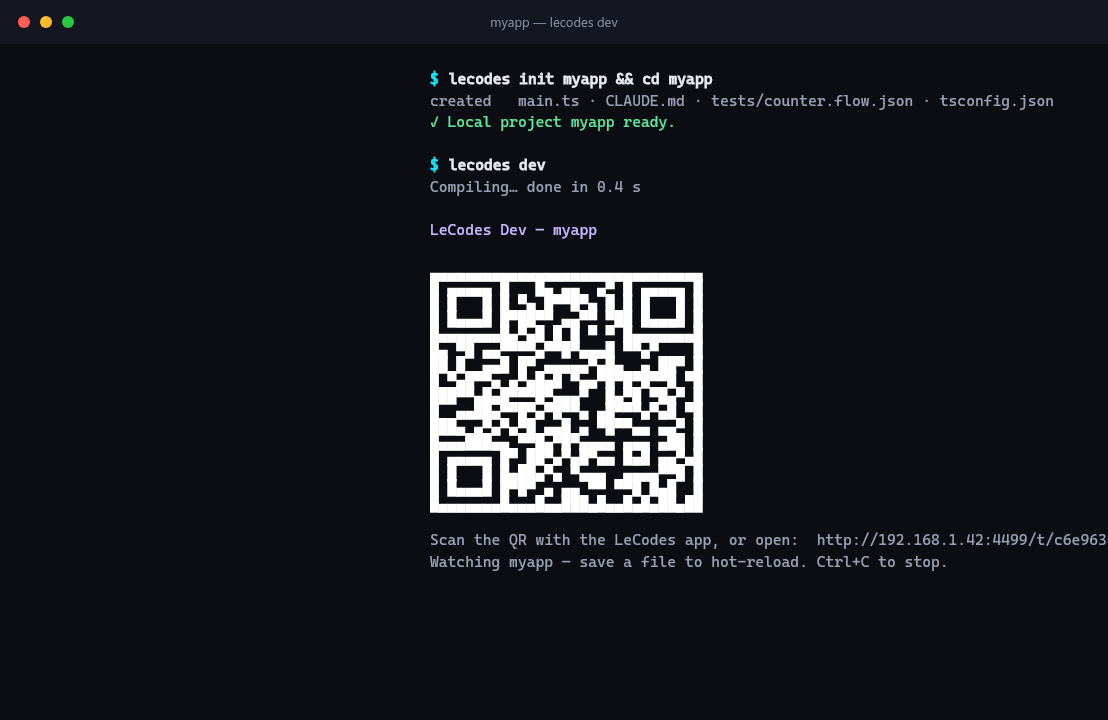
lecodes dev prints a QR code — scan it with the le.codes app and the project opens on your phone natively. Save a file and the phone updates, no rebuild. An error rolls back to the last working version; device logs go to the terminal. The same project runs in the browser, in a native window on your computer and on Android over USB.
Claude Code, Codex, Cursor, Gemini CLI — anything that can run terminal commands. From the first second the project carries a CLAUDE.md that teaches the agent to verify the result with a render and tests instead of guessing; the scene and design editors bring up MCP servers. Your subscription, your model — no platform credits needed.
Your editor with full autocompletion, your git, your CI. No node_modules and no native build: lecodes compile builds the bundle in under a second without a server. You connect to the platform with one command whenever you like — and disconnect the same way.
How it works
npm i -g lecodes-cli        # or a single binary without Node: ./lecodes install
lecodes init myapp          # a project on disk — no account, no server
cd myapp && lecodes dev     # QR → phone; save a file and the phone updates
That's it. From here on — your editor and any AI agent. When the app is ready, lecodes link --push connects the folder to the platform and gives you a link with a QR code; lecodes push --publish publishes every next version — it's instantly available to everyone who opened the link. Every step, with command output and flags, is in the CLI guide.
Verification without a device
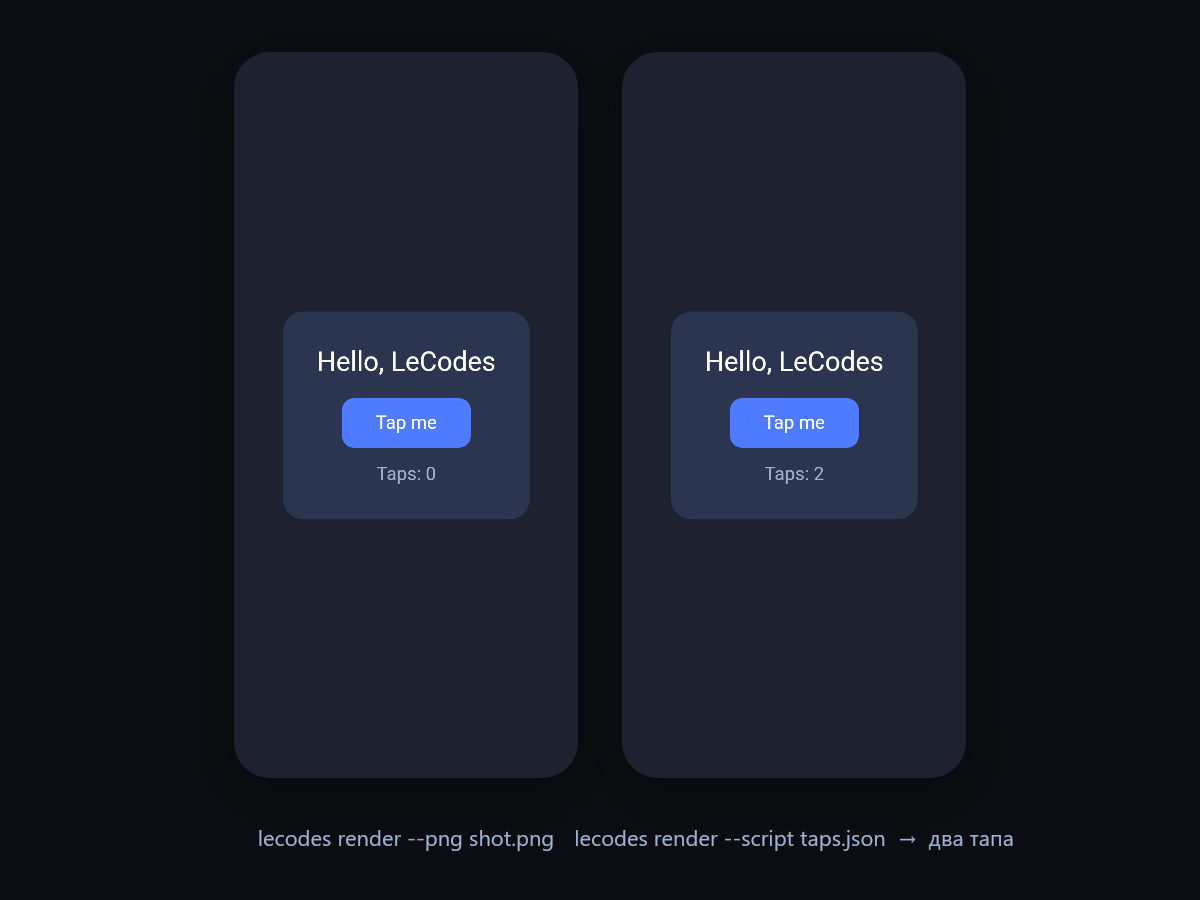
You don't need a phone to see the app. lecodes render runs the project headless and returns a frame or the semantic JSON of the UI; --script plays a scenario — taps, input, keys, game frames — and captures after it. Useful scenarios stay in tests/*.flow.json and become regression tests: lecodes test runs them with deterministic time and real Jolt physics, and a failed step saves the frame as JSON and PNG. This is what makes an AI agent useful rather than dangerous: it sees the result of its code.
From the terminal — to le.store.
lecodes push --publish publishes the project through the platform: it gets a link and a QR code. A phone with the le.codes app opens it natively; without the app it offers to install it or runs in the browser. And on le.store — the catalogue of apps built on le.codes — you connect your account and list the app so others can find and open it.
Every republish is a free update for everyone who opened the app by link: the host pulls the new version on launch. No store queues to fix one button.
Want the App Store and Google Play under your own name? lecodes app init ios and android generate a shell with your bundle id, build builds it, upload ios sends it to App Store Connect. app build desktop gives a portable folder for Windows, Linux and macOS of about 11 MB. Xcode and Android Studio are needed for the build.
Content in the same command.
lecodes assets converts FBX to GLB with textures inside, repairs models (doctor) and retargets animations from another skeleton — including Mixamo, Unity .anim and Unreal .uasset.
lecodes shaders compiles your own materials in the Filament language locally, lecodes lightmap bakes the lighting of a level's static geometry, lecodes navmesh builds the navigation mesh.
lecodes scene is a visual 3D-scene editor right on top of .scene.ts, lecodes design a screen board for prototyping. Both register MCP servers for an AI agent. What the engine itself can do is on the le.codes engine page.
All 25 commands
lecodes --help shows everything by group, lecodes <command> --help the flags, subcommands and examples. The help is generated from the same definitions as the commands themselves, so it never drifts from the behaviour.
| Group | Commands |
|---|---|
| Project | init · create · clone · link · status · diff · pull · push · login |
| Run and verify | dev · compile · render · test · desktop |
| Editors | design · scene · thumbs |
| Content | assets · shaders · lightmap · navmesh |
| Native apps | app · pn |
| Maintenance | update · install |
Honestly about the limits
- The standalone binary doesn't resolve npm packages:
render,test,design,sceneandassetsrequire the npm install. devruns on Node, not on Bun.render --desktopandtest --desktopare Windows and Linux only; headless doesn't rasterize 3D, it returns the scene as JSON.- The path to the App Store and Google Play under your own name is yours: the CLI prepares and uploads the shell, but Xcode or Android Studio are needed. Don't want to? Write to support — for now we publish by hand on request; the details are in the guide.
Free on every plan: the CLI, compilation, publishing and le.store don't spend credits — those are only needed by the assistant in the editor.
Common questions about the CLI
If you didn't find the answer, write to us — we reply within a day.
support@le.codesYes. The CLI, compilation, hot reload, headless render, tests and publishing don't spend credits — those are only needed by the assistant in the editor. Free on every plan.
Not for local work: `lecodes init` creates a project on disk, `lecodes dev` opens it on your phone, `lecodes compile` builds the bundle. You'll need an account when you want to publish the app through the platform or sync the project between machines.
Yes, any that can run terminal commands: Claude Code, Codex, Cursor, Gemini CLI. The project carries a `CLAUDE.md` with instructions to verify the result with a render and tests, and `lecodes design` and `lecodes scene` bring up MCP servers. The keys and the subscription are yours; platform credits aren't spent.
On purpose: the runtime on the device is neither Node nor a browser, and the compiler needs to see all the code to shrink it to kilobytes. The SDK has networking, WebSocket, storage, media, maps, camera, push, math, physics and animation; component libraries come through le.store and `lecodes-libraries`.
`lecodes push --publish` publishes the project through the platform: it gets a link and a QR code, and every republish is a free update for everyone. On le.store you connect your account and list the app in the catalogue. For the App Store and Google Play under your own name — `lecodes app`, with Xcode or Android Studio.
Node 18 or newer for the npm install; without Node, the standalone build from the Downloads page works. Windows, macOS, Linux. For `render` and `test` the CLI fetches `lecodes-renderer` itself on first run; `render --desktop` is Windows and Linux only.
No. It's ordinary TypeScript in an ordinary folder: your editor, your git, your CI. `lecodes compile` builds the bundle locally without a server, and you can disconnect from the platform at any time — the files stay with you.
Publish your app on le.store
Three commands — the app is on your phone; one more — it's on le.store with a link and a QR code. Free; you'll need an account only to publish.
Start with the guide